
Managers and team leads can’t be present on every call to get a pulse on customer and agent interactions. That’s where call center quality monitoring software comes in—this technology provides direct insight into how agents handle calls and if company standards are being met.
By reviewing recorded calls, managers and team leads can track script adherence, customer sentiment, agent proficiency, how tense situations are being de-escalated, and more.
But while traditional call monitoring is useful, it’s limited in terms of sample size, and can’t deliver meaningful customer experience insights at scale. That is, unless you add a quality assurance framework.
QA, especially AI quality assurance, closes the gap between reviewing and improving. You can score up to 100% of conversations and uncover the kind of insights that just wouldn’t be possible with manual quality monitoring.
But first, let’s explore what call monitoring software does, who the best vendors are, and where AI-QA comes in.
Call monitoring software lets contact centers evaluate and analyze customer-agent calls using features like live listening, call scoring, and analytics. The aim of doing so is to review service quality, ensure compliance, and identify coaching opportunities.
Unlike simple call recording tools, call quality monitoring tools add evaluation methods to give you performance insights.
Typical features include:
There are an abundance of other features that may come with call monitoring software, such as:
If these aren’t included in the software, they ideally can be easily integrated with the call monitoring software.
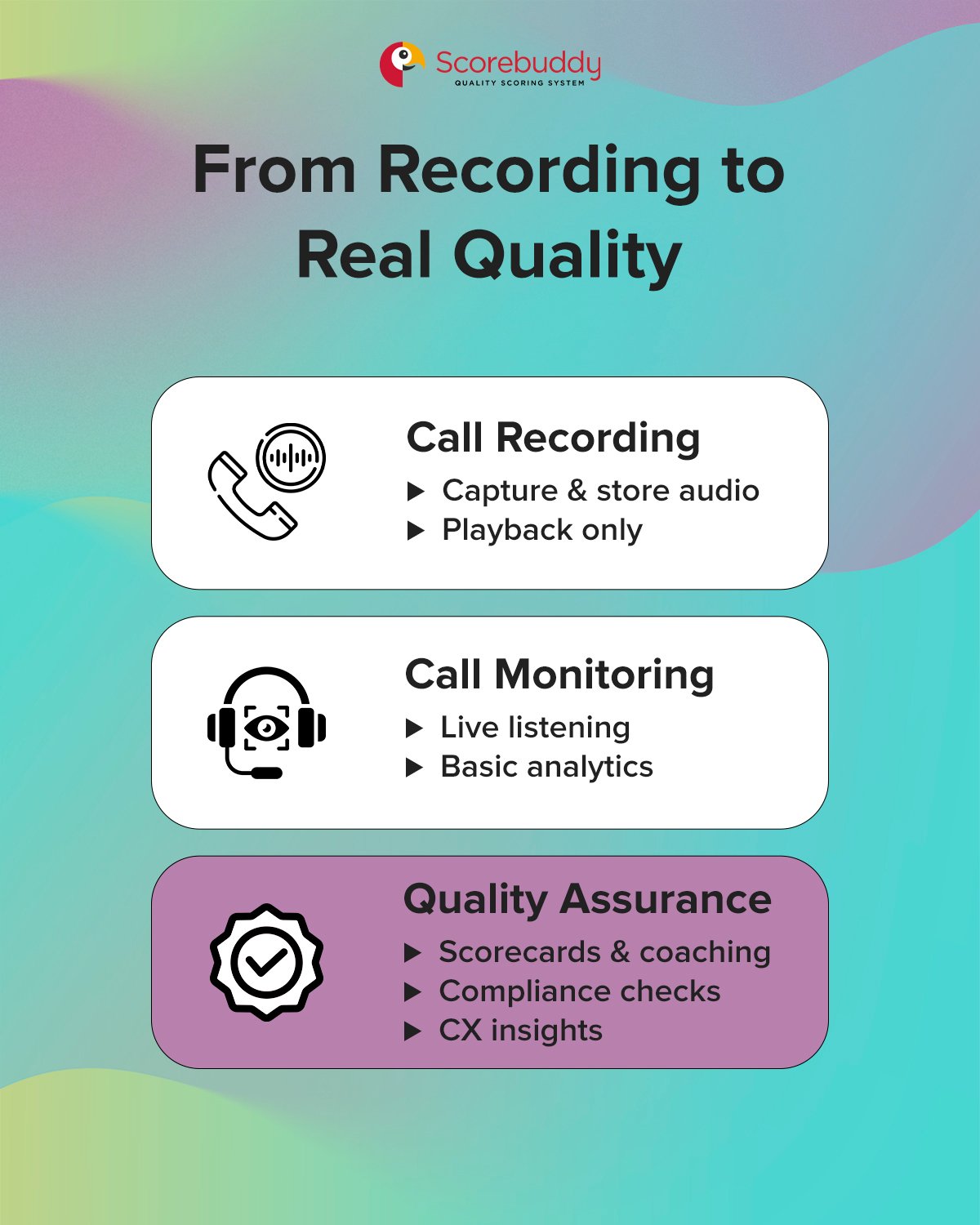
The aim of call recording is to capture and store audio of customer-agent calls.
This creates an archive of service interactions, but there’s no evaluation involved at this point. Typical features include the stop/start recording, secure storage, and playback controls.
The call monitoring process is about getting visibility into calls (live or recorded), to assess service quality and agent performance. This shows you what happened in a conversation and flags issues. Typical features are live listening, whisper/barger, and basic call analytics.
Contact center quality assurance involves evaluating customer interactions against clear, pre-defined criteria like compliance, soft skills, accuracy, and others. This gives you actionable insights you can use to improve CX and agent performance, and ensure compliance.
Key QA features include:
With call monitoring software, the idea is not to “spy” on contact center agents—your team should know that it is in place. Rather, it should be viewed as a helpful tool for supporting an agent’s growth and potential over time, and in turn, improve the customer service provided.
The insights derived from effective call monitoring benefit everyone involved in the customer service experience and lead to measurable business improvements.
.jpg?width=1200&height=1500&name=Images%20for%20Blog%20%235%20-%20Call%20Monitoring%20Software%20-%202%20copy%20(1).jpg)
Through recorded calls, a manager might pick up on the fact that the new hires are struggling to de-escalate angry customers. Even if this was part of training, this consistent pattern shows it would be helpful to provide additional coaching.
To support the agents, managers can replay parts of specific calls and demonstrate where certain phrasing could be used to improve the outcome.
If customers have been leaving lower CSAT scores after a company update on a cancellation policy, it’s time to review conversations to understand where the frustration is coming from.
Managers may realize that customers are repeatedly confused by the new cancellation policy. This would mean it’s time to clarify this on the company website, update FAQs, and train agents to define the policy upfront.
When shopping around for call center call monitoring software, most options should meet the basic checklist of recording and listening features. Managers will also want software with a clear dashboard and customizable views, with straightforward search functions to pull reports.
The right solution for your company should not only offer these core features, but also capabilities like:
When you already have a suite of essential tools, such as workforce management software, help desks, CRM systems, and analytic dashboards, you’ll want to ensure that call monitoring solutions can integrate seamlessly into the workflow.
This will reduce the time spent on manual work and human error, ideally making the processes easier for agents.
When a CRM platform and call monitoring system are integrated, the customer’s information and past interactions should pop up with the incoming call. The CRM can then record the call details, like the call duration, notes from the agent, and the recording itself.
This saves the agent time looking for customer information and provides a single spot for details on current and past interactions.
Even better than reviewing issues on a recorded call is preventing a problem the moment an issue arises. Real-time monitoring can send alerts to managers and let them know that it’s time to step in and support the agent, whether it be using the whisper functionality or joining the call.
This proactive capability:
If an agent has consistently made the mistake of forgetting to read a compliance script to the customer, an alert can be sent to the manager, who can then use the whisper function to remind the agent.
To meet industry regulations, security and compliance support should be built into call monitoring software. These capabilities protect sensitive customer data, such as healthcare data or billing and payment information.
With compliance monitoring capabilities, data breaches, fines, and reputational damage are minimized.
If a customer is calling to update their payment information, the call center software would either pause or distort the audio when the numbers are being read aloud to ensure that they are not recorded.
You can use this simple checklist as a point of reference when evaluating potential call monitoring software for your contact center. Looks for tools that offer:
Best for enterprise quality assurance and coaching workflows
A leader in AI-powered contact center quality assurance, Scorebuddy is the best option for post-interaction call monitoring. With customizable scorecards, AI Auto
Scoring, and integrated coaching workflows, Scorebuddy provides a central platform for even the most complex QA functions.
This gives visibility into agent performance and the customer experience, thanks to integration with leading CRMs, CCaaS platforms, recording systems, and workforce management software (WFM).
Best for deep sentiment insights
Uses AI to analyze 100% of customer interactions and automatically scores them, delivering customer insights and coaching opportunities to managers.
Best for those seeking a CCaaS option
A cloud-based contact center software with call monitoring, using AI for automation, efficiency, and personalized customer service.
Best for advanced routing needs
A cloud-based call center solution that supports multichannels, implementing AI for intelligent call routing and an interactive voice response system.
Best for real-time needs
Embeds real-time transcription, sentiment analysis, and a clean interface for supervisors to monitor ongoing calls live.
Best for inbound/outbound balance
Offers live monitoring, speech analytics, and integration with CRMs to assist both support agents and sales teams.
Managers manually reviewing calls should strive for 3-5 per agent every week.
Listening to a select sample of calls like this can give managers a small window into customer and agent interactions—but often, this isn’t sufficient.
Monitoring alone is not the same thing as quality control. Simply listening to recorded calls doesn’t guarantee enhanced agent performance and customer service. It shows what happened, but it doesn’t automatically demonstrate, “What can we do better?”
Call monitoring systems show the basics, like how long the call lasted, what the customer and agent said, and whether or not certain processes were maintained. What the software on its own doesn’t do—and what truly matters for quality assurance—is:
Without a quality assurance framework in place, monitoring calls can feel like having all the ingredients out for a recipe, but not having the measurements to make the dish. The potential is there, but guidance is needed to make something of the raw ingredients.
With thousands of calls a week, and seemingly endless hours of recordings, call monitoring can turn into a data overload. Actionable insights cannot be drawn from random samples or a small selection, and managers can get bogged down with the sheer volume of recordings.
When a structured evaluation criteria is missing, raw data cannot have much impact on its own.
And spending hours just listening to calls can turn into a waste of valuable time and resources. Even if a manager can glean insights from listening to a few samples of calls, this method is inconsistent and inefficient.
A QA framework ensures that the call monitoring system is not just another task, but a powerful tool that provides feedback to agents and actionable takeaways for supervisors and managers.
Imagine reviewing hundreds of hours of video footage of the same frame inside of a store. You’re not sure exactly what you’re looking for, but rather waiting to see
if anything happens, whether it be good or bad. The task is repetitive and mostly mundane.
But if you have instructions such as “Monitor to see if the customers’ mood changed from when they entered the store to when they left,” suddenly, you’re viewing the footage with context and purpose.
This is exactly how a QA framework transforms the raw data from a call center monitoring system. While call monitoring records what happened during a customer-agent interaction, QA gives meaning to the information that was captured.
Here’s how your QA framework can transform passive call monitoring observations into an active tool to support seamless customer experiences:
Give quality monitoring structure with Scorebuddy’s QA scorecard template

Even when you have a QA framework in place, traditional call monitoring is still limited in terms of scale.
A manager reviews the call after it’s finished, identifies issues that occurred, and corrects them later. Over time, some problem areas should get fixed—and that’s great. But what if you could avoid a frustrated customer, a struggling agent, and a manager playing catch-up altogether?
AI-powered QA scales call monitoring capabilities by adding automation, speed, extensive analysis, and the ability to evaluate 100% of calls. It’s no surprise that 87% of contact centers are projected to integrate AI technology.
Rather than analyzing a 2 to 3% sample of calls, as you would with traditional QA methods, AI can score up to 100% in a fraction of the time. Think of AI-powered QA as comprehensive coverage that ensures no interactions or blind spots slip through the cracks. This brings:
AI-powered QA automates hundreds of hours of repetitive tasks. If agents take between 30-50 calls per day, managers can’t manually review this volume of calls from every agent. With AI doing the heavy lifting, this leaves more time for managers to focus on more impactful work.
With truly reflective QA coverage, AI allows for a deeper understanding of the customer experience. You can identify customer sentiment trends, root causes of escalation, churn triggers, and more, at a scale that was impossible before.
Rather than just highlighting what went wrong in the moment, AI-powered QA identifies patterns for individual agents and for the entire team. If multiple agents struggle to explain a policy, this can be recognized quickly, and targeted training sessions can be employed.
Try a demo of Scorebuddy’s AI-powered QA

Call center quality monitoring software is a valuable tool that shows what happens on a customer service call, but on its own, it doesn’t deliver the maximum impact.
Without a quality assurance tool in place, the data just remains data, and it’s difficult to pull strategic insights from it. By integrating AI-powered QA, raw call data can be transformed into CX learning.
When 100% of calls are evaluated with AI quality assurance, you can measure CX, ensure compliance with industry standards, and uncover coaching opportunities at scale. This reduces both cost and workload, and sets the stage for stronger customer satisfaction scores.
With Scorebuddy’s AI contact center quality assurance, you can:
Analyze 50x more conversations
Reduce manual QA workload 60%
Score interactions in under 5 seconds
Try AI-powered QA with Scorebuddy.